Window Technical Support

  • Subscribe to our RSS feed.
  • Twitter
  • StumbleUpon
  • Reddit
  • Facebook
  • Digg

Friday, 30 August 2013

2008 R2 - Enable Multiple RDP sessions

Posted on 04:19 by Unknown


Server 2008 R2 Option 1: Enable Multiple RDP sessions from TSCONFIG

Note: tsconfig.msc does not work on Windows Server 2012
1. On the server, click Start and in the search/run box type tsconfig.msc{enter}. Locate "Restrict each user to a single session" Right click > Properties.
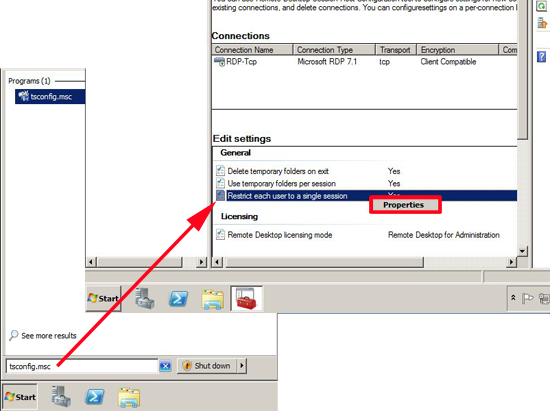
TSCONFIG
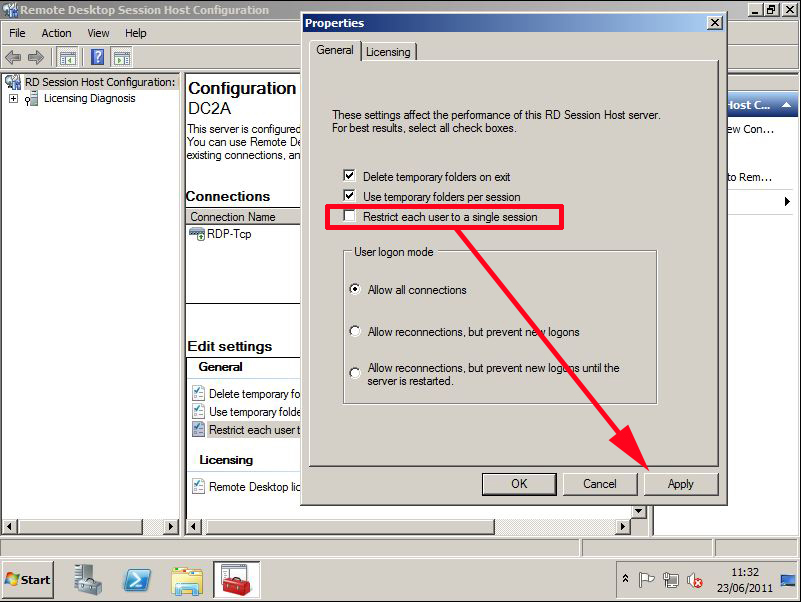
2. Remove the tick from "Restrict each user to a single session" > Apply > OK.
Restric each logon to a single session
Email ThisBlogThis!Share to XShare to FacebookShare to Pinterest
Posted in | No comments
Newer Post Older Post Home

0 comments:

Post a Comment

Subscribe to: Post Comments (Atom)

Popular Posts

  • Adding Host (A) DNS Records in Windows Server 2008 R2
    About DNS Records Since DNS server plays an important role when it comes to keeping the network up and accessible, it becomes important for...
  • How to configure ftp server in windows
      FTP Server using IIS 7.0 and Windows Server 2008 Open Server Manager, go to Roles and click “Add Roles” In the Add Role Wizard, select Web...
  • install Active Directory in Windows Server 2003
    Click Start -> Run... Type "dcpromo" and click "OK" You will see the first window of the wizard.  As it suggests, I ...
  • Configuring Windows Server 2008 Remote Desktop Administration
    Windows Server 2008 is, as the name suggests, a server operating system. In the real world this means that systems running Windows Server ...
  • SMTP Server Configure on Windows Server 2008 R2
    Installing the SMTP feature 1 . Click Start > Run and then enter servermanager.msc in the Open dialogue box then click OK to load Se...
  • configure Active Directory in Windows Server 2008 R2 Part-2
    Configure Active Directory At the Server Management screen you should now see that you have 1 role installed.  The Active Directory D...
  • Transferring FSMO Roles in Windows Server 2008
    Introduction This is a must to read article for any system administrator who administers Microsoft Windows Servers. One of any...
  • VPN connection Configuring on server 2008 R2 using RRAS and configuring clients
    A virtual private network (VPN) is a network that uses a public telecommunication infrastructure, such as the Internet, to provide remote of...
  • How To Activate Exchange Server 2010
    1) Open Exchange Server Management Console Click on Start > All Programs > Microsoft Exchange ...
  • Installing and configuration Distributed File System
    The Distributed File System (DFS) technologies offer wide area network (WAN)-friendly replication as well as simplified, highly available ...

Blog Archive

  • ▼  2013 (91)
    • ►  December (2)
    • ►  November (10)
    • ►  October (5)
    • ►  September (15)
    • ▼  August (26)
      • Creating a Capture Image in WDS
      • 2008 R2 - Enable Multiple RDP sessions
      • What is virtual private network (VPN)?
      • Important Tips for Before Going on ANY Interview
      • VMware Admin Interview Questions & Answers.
      • Change RDP Port on Windows XP
      • FTP Server and its Commands
      • Block IP address with Windows Firewall 2008
      • Disable Shutdown option in Windows
      • windows server 2008 password complexity
      • Microsoft Certification paper codes
      • Technical Interview Questions - Windows Server 200...
      • Technical Interview Questions - Windows Server 200...
      • Technical Interview Questions - Exchange Server 20...
      • Technical Interview Questions – MCSE & System Admi...
      • Technical Interview Questions – Active Directory P...
      • Technical Interview Questions – Networking Part2
      • Technical Interview Questions - Windows Server 200...
      • windows server 2008 r2 interview questions and ans...
      • windows server 2008 r2 interview questions and ans...
      • windows server 2008 r2 interview questions and ans...
      • Virtual Hard Disks
      • Upgrading Windows Vista to Windows 7
      • Upgrading Windows XP to Windows 7
      • Pv6 Addressing
      • List of Server Role services in Windows Server 200...
    • ►  July (1)
    • ►  June (5)
    • ►  May (14)
    • ►  April (5)
    • ►  March (1)
    • ►  February (1)
    • ►  January (6)
Powered by Blogger.

About Me

Unknown
View my complete profile